


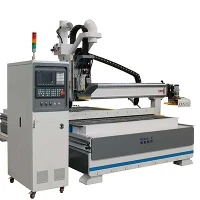
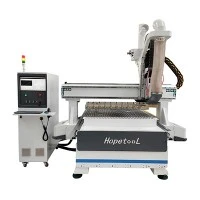


Cylinder CNC Router
Product Introduction
We are the professional Cylinder CNC Router supplier, with our core products of CNC Carving Router, 3D Wood Router, 4 Axis Wood Carving CNC Router, etc. Our products are widely used in engraving, cutting, milling, drilling and other processing for different materials, like wood, metal, aluminum plates, plastics, density boards.


Product Center

High Cutting Precision
Cylinder CNC Router is equipped with linear guide and ball screw, and adopts computerized control system for cutting line design. Through automatic tool change, automatic tool setting and flexible speed regulation operation, it can realize high speed and precise cutting.

Fast Cutting Speed
Cylinder CNC Router is driven by servo system and stepper system, which can transmit processing data at high speed, and also uses alloy cutting tools to quickly cut materials, thereby improving processing efficiency.

Highly Customizable
Our Cylinder CNC Routers are available in a variety of models and sizes. And their servo systems, control systems, tool materials and frame structures can all be customized to ensure that they can meet any cutting task you need.

Competitive Price
The quality of our Cylinder CNC Router meets market standards, and we also provide discounts ranging from 10% to 30% for customers who place large quantities and repeat orders.
Company Advantages
Rich eXperience:
Our company was established in 2008, with more than 200 employees and 15 years of Cylinder CNC Router production experience, able to provide you with professional services and product solutions.
Advanced Technology:
We have obtained a number of patent certificates, including CE, ISO, and other patent certificates to ensure the quality of our products.
High Strength
We have a 5-axis CNC center machine tool with large-volume equipment manufacturing capabilities. The production time is about 10-20 days, and the monthly production volume is 120 units.
Good Reputation:
We offer warranty of 2 years for our products, and the Cylinder CNC Router we produce has been exported to more than 80 countries, helping us to gain trust from customers.

Patent Certificate
Our Cylinder CNC Router products comply with strict production processes standards and have obtained various international standards, including CE, ISO and other certificates as well as multiple production patents. Below is our certificate display
Factory Environment
If you are interested in our production environment and processes, the following content will give you a general understanding of it.


Customer Case
Our Cylinder CNC Router sells well in more than 80 countries around the world, customers are very satisfied with our product quality and service. Here are some real pictures of customers we have cooperated with.
FAQ
Q: 1.Can a Cylinder CNC Router process stone?
Q: 2.What are the common electrical faults of Cylinder CNC Router?
(2)Wiring faults: Loose wires can interrupt the flow of power to the machine, causing a short circuit.
(3)Control system failure: Damaged sensors, relays, or circuit boards can cause the machine to operate erratically or shut down completely.
(4)Overheating: If the ventilation is poor or the cooling fan is damaged, the machine will accumulate too much heat, which will damage the electrical components and cause them to malfunction. (5)Electrical Interference: External electrical noise and interference can disrupt signals between different parts of the machine, causing erroneous or incorrect feed actions.
Q: 3.What are the common mechanical failures of Cylinder CNC Router?
(2)The worktable of the Cylinder CNC Router cannot perform continuous its feed motion, especially during milling.
(3)suddenly, the workbench moves rapidly when it is performing uniform speed feed motion.
(4)When it starts to feed, smoke appears in the feed box. (5)When the main shaft changes speed, there is an obvious impact sound in the gearbox, and the handle needs to be pulled back and forth several times before the gears of the gearbox can enter the meshing state.
Q: 4. What are the common problems and causes of CNC Carving Router?
(2)Rough engraving surface: This may be caused by tool wear, too fast cutting speed or too deep cutting depth. At this time, we need to replace new tools, adjust cutting parameters or appropriately reduce the cutting depth.
(3)Abnormal operation of the equipment: This is caused by power problems, mechanical failure or driver failure. What we need to do first is to check whether the power cord is loose and whether the fuse is blown; secondly, check whether the mechanical parts are worn or damaged; and finally, check whether the drive is working properly.
(4)Program errors: Program errors may cause processing problems or equipment to stop working. Check whether the G code is correct and ensure that the program is correct. If there is any problem, modify and reload the program in time.
(5)Excessive errors: Processing errors may be caused by tool wear, equipment looseness or positioning errors. Solutions include replacing the tool, tightening loose parts, or recalibrating the equipment. (6)Operator's misoperation: Operator's misoperation may cause equipment damage or create safety hazards. They should receive professional training in advance and be familiar with equipment operating procedures.
Q: 5. How to clean and maintain the CNC Carving Router?
(2)Use special detergent and soft cloth to clean the casing and operating table. Do not use corrosive detergents such as acids, alkali, alcohol, etc. (3)Clean the tool chuck, tool socket and other parts to make them clean, to have clear engraving lines.
Q: 6. How to lubricate and maintain CNC Carving Router?
(2)Check the oil level and quality of the lubricating oil, and add lubricating oil in time to avoid component movement failures caused by poor lubrication. (3)Clean impurities and sediments in the lubrication system, allowing it to lubricate quickly, reduce wear of equipment components.
Q: 7. How to perform electrical maintenance on 3D Wood Router?
(2)Check the heat dissipation of the device and the working status of the electrical components to ensure that they are within the normal operating temperature range to avoid component damage caused by overheating.
Q: 8. How to maintain the mechanical part of CNC Carving Router?
(2)Check the tool chuck, tool socket and other components of the CNC engraving machine, and lubricate and replace them regularly.
Q: 9. What are the precautions for using 4 Axis Wood Carving CNC Router?
(2)When starting up, first turn on the main power supply, and then press the machine tool button after the milling machine has detected all functions to reset the milling machine and put it in standby mode.
(3)When operating manually, the Z axis must be in the tool lifting position before moving in the X and Y directions. After the tool has moved into place, look at the CRT screen to make fine adjustments.
(4)Beginners should try to use the G00 command as little as possible, especially in the three-axis linkage of X, Y, and Z. When moving the empty tool, the movement of the Z axis should be carried out separately from the movement of the X and Y axes. Which means that you should lift the tool more and insert it diagonally less to reduce damage to the tool.
(5)When using a computer for serial communication processing, you must first turn on the milling machine, then turn on the computer; first turn off the computer, then turn off the milling machine.
(6)When using the DNC (program transfer between computer and milling machine) function, pay attention to the memory capacity of the milling machine. Generally, the total number of bytes of the program should be less than 23kB. If the program is relatively long, the computer must use the method of transmitting and processing at the same time, but the program segment number must not exceed N9999. If there are more than 10,000 program segments, you can use the program editing function in MASTERCAM to cancel the program segment number. (7)When an alarm occurs on the 4 Axis Wood Carving CNC Router, you must find the cause according to the alarm number and clear the alarm in time instead of shutting down directly.
Q: 10. What are the main reason of the crashes for 4 Axis Wood Carving CNC Router?
2. Wrong standard of the workpiece and the initial positioning operation. 3. The workpiece coordinate system of the machine tool is set incorrectly, causing the zero point of the machine tool to change during the processing process and causing collisions during rapid movement.